By Joe Sgroi, Knight ATV · November 25, 2026
You pull up to a fork in the trail, nobody's sure which way camp is, and your phone is zipped in a jacket pocket under a layer of mud. You stop, peel off a glove, dig it out, wipe the screen on your pants and hope it doesn't slip into the puddle you're parked in. Every rider has been there. A good ATV phone mount fixes all of that, and a bad one can cost you the phone.
I'm Joe Sgroi, founder of Knight ATV. We designed the SafeBox because we kept wrecking phones on our own rides. This guide covers what actually matters when you pick the best ATV phone mount for mud, water and rough trails, where to put it on your machine, and how to set your phone up so it's ready before you ever leave the trailer.

Quick answer: what makes the best ATV phone mount
- Fully sealed. Waterproof, mudproof and dustproof, so the phone itself never touches the mess.
- Full touchscreen use through the cover, so you can run maps, music and the camera without opening the case.
- A snug fit for your phone, with its case on. Foam padding holds it tight so it doesn't rattle around.
- Mounts that fit your machine: flat surfaces, handlebars, racks and roll cages, ideally without drilling.
- A clear back window for photos and video, and room to charge on long days.
- Replaceable wear parts, so one torn screen cover or crushed foam piece doesn't mean buying a whole new mount.
Why an ATV is hard on a phone
Your phone was built for pockets, desks and car cupholders. An ATV throws four things at it that it was never designed for:
- Water, mud and grit. Splash from every puddle, spray off the front tires, and fine dust on dry trails.
- Vibration. Hours of it, coming up through the frame and bars.
- Heat and cold. Full sun on a summer ride, or a frosty November morning in the deer woods.
- Drops. One loose clamp or a branch catching the phone, and it's in the creek.

Vibration and your phone's camera
Apple has a support article on this. It says long-term exposure to high-amplitude vibration in certain frequency ranges, like the vibration from high-power motorcycle engines, can degrade the optical image stabilization and autofocus in iPhone cameras. Apple recommends avoiding extended high-amplitude vibration, and for small-engine vehicles it recommends a vibration-dampening mount and avoiding prolonged use. Apple doesn't mention ATVs by name, but the lesson carries over: hold the phone snug, cushion it, and mount it to a solid spot so it isn't bouncing and buzzing against hard plastic all day.
That's why every SafeBox comes with four pieces of foam. You cut them to your phone so it sits flush against the touchscreen cover and can't shift around inside the case. Our SafeBox foam installation video walks through it step by step.
1. Sealed beats "water resistant"
A lot of riders figure their phone is already waterproof, so a basic clamp-style holder is enough. Here's what Apple actually says about its IP68-rated iPhones: the rating comes from controlled lab testing, water and dust resistance "are not permanent conditions" and can decrease with normal wear, and liquid damage is not covered under warranty. Apple also says to avoid pressurized or high-velocity water and direct contact with larger particles like sand, and to clean the phone right away if it gets into dirt or sand.
That's a pretty good description of a mud run. Roost off the tires and a splash through a water crossing is high-velocity water and grit, again and again. A sealed case keeps all of it off the phone. The SafeBox is completely waterproof, mudproof and dustproof, and Knight ATV designed it for ATVs, UTVs, jet skis, snowmobiles, kayaks and boats. After a muddy day you rinse the case, not your phone.

Planning a wet ride? Our guides to ATV water crossings, mud riding and riding in the rain cover the machine side.
2. Full touchscreen use, without opening the case
A sealed case is only half the job. If you have to open it every time you want to check the map, it'll end up back in your pocket. The SafeBox has a touchscreen cover that gives you full use of your phone while it's sealed inside: maps, music, calls and the camera.

A few tips that make the touchscreen work even better on the trail:
- Gloves: heavy riding gloves usually won't register on any touchscreen. Gloves with touchscreen fingertips solve it, or slip one glove off at a stop.
- Keep the screen awake: on an iPhone, go to Settings, then Display & Brightness, then Auto-Lock, and pick a longer time so the screen doesn't lock between glances. Apple notes that a longer Auto-Lock uses more battery, so pair it with a charger on long days.
- Use your voice and your remote: Siri or Google Assistant can change songs or start directions without touching the screen. If your ATV has Knight ATV speakers, the wireless handlebar remote ($14.99) handles volume and tracks right from the grip.
3. A snug fit for your phone, with the case on
Lots of riders keep a thick protective case on their phone and don't want to take it off every time they ride. The SafeBox fits all iPhones, Samsung Galaxy phones and more, even with a case on. The interior is 7.25" x 3.6" x 1", and the foam fills whatever space is left so the phone stays put.

One rider put it well in his review: the SafeBox "fits my s25 ultra and case with a tight fit so the phone dosent bounce around." That tight fit is what you want for all the reasons in the vibration section above. If your foam ever gets worn or you switch phones, replacement foam is $15.99.
4. Mounting options that fit your machine
Every ATV is different, and the best spot on a Sportsman isn't the best spot on a Grizzly or a side-by-side. Look for a system that gives you options. Here's how the SafeBox mounts:
- Flat Mount (included). Our proprietary mounting plate attaches to any flat surface, vertically or horizontally. It also has a 3/4" threaded hole that accepts standard 3/4" PVC pipe, which opens up a lot of custom setups. Extra Flat Mounts are $18.99 if you want the box to move between machines.
- Rack/Handle Bar Mounting Kit ($9.99). No drilling. It fits any bar from 3/4" to 1 1/8", with a non-slip rubber strip and a set screw.
- Roll Cage Mounting Kit ($14.99). For side-by-sides, no drilling. It fits bars from 1.5" to 2".
- PVC Mounting Kit ($14.99). A mounting puck, spacer, PVC section, adapters, elbows, hardware and glue, so you can put the SafeBox right where you want it. The base mount alone is $9.99.
- Slant Mounting Kit ($19.99). Angles the box toward you on a flat surface.
- Can-Am and CFMOTO accessory points. Our Can-Am LinQ brackets and CFMOTO quick connect brackets ($14.99 each) have 3/4" PVC threaded plugs that attach to our phone holder and cup holders.

Here's the PVC Mounting Kit going on an ATV, start to finish. Jump to 4:52 for mounting and 5:51 for putting the phone in:

5. A camera window and room to charge
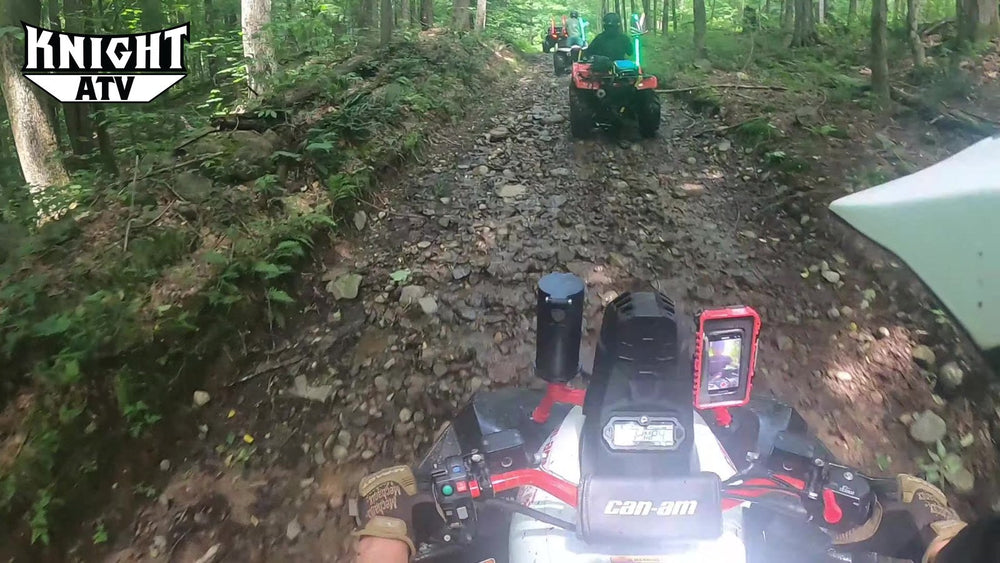
Half the fun of a big ride is the video. The SafeBox has a clear HD window on the back, so you can shoot photos and video without taking the phone out of the case. Mount it facing forward and you've got a handlebar cam that's sealed against the mud.

For long days, the case is designed with space for a battery backup wireless charger (sold separately), so you can charge your phone while it's sealed inside. One thing to know from Apple's own guidance: wireless charging warms a phone up, and in hot conditions or direct sun an iPhone may slow or stop charging, dim the display or show a temperature warning until it cools down. On a hot day, mount the box where it gets some airflow and top off the battery at lunch in the shade.
Where to mount a phone on an ATV
The best spot is the one where you can glance at the screen without taking your eyes off the trail for long, and where the box never gets in the way of riding. A few rules we follow:
- Keep it clear of the controls. Make sure it doesn't touch the throttle, brake levers, switches or your knees at full lock in either direction.
- Keep the gauges visible. Don't block your speedometer or warning lights.
- Mount to something solid. A rack, the bars or a flat spot on the fender or dash, tightened down well, so the box isn't flexing on a long arm.
- Check it after the first ride. Snug the hardware again after the first few miles of bumps.
- Set your route before you roll. Glance at the map, don't stare at it, and stop if you need to type anything.

Set up your phone before the ride
A sealed, mounted phone does a lot more when it's set up right. Take ten minutes at home, before you lose signal:
- Download offline maps. Apple Maps (iOS 17 or later) and Google Maps both let you download an area and get turn-by-turn directions with no cell signal. Google Maps offline areas expire, so update them before a trip. Apple notes that offline maps are only available in some areas, so check yours.
- Know your emergency options. iPhone 14 and later can text emergency services through Emergency SOS via satellite when there's no cell or Wi-Fi coverage, as long as you have a clear view of the sky. Set up your Medical ID and emergency contacts ahead of time so they're shared automatically.
- Start with a full battery and carry a backup for long days.
- Mind the temperature. Apple designs iPhones for use between 32° and 95°F. In real cold, battery life drops for a while and the phone can shut off until it warms up, so on winter rides keep the phone warm until you need it and bring a charger.

The Knight ATV SafeBox
We built the SafeBox to tick every box above. It's sealed against water, mud and dust, you get full use of your touchscreen, it fits iPhones and Galaxy phones with the case on, and it mounts just about anywhere. Here's what's in the box and what it costs today:

- Phone Holder SafeBox with Flat Mount: $89.99. Includes the SafeBox, Flat Mounting Plate, parts bag and a full set of foam (4 pieces). Available in a long list of colors, from black and gray to red, blue, green, orange and pink.
- SafeBox and Knight Shield drink holder bundle: $129.99 to $149.99 depending on mounts, which saves $20.
- Knight Shield sealed can holder on its own: $64.99.
- SafeBox Replacement Touchscreen: $19.99, with adhesive ready to install.
- Mounts: Rack/Handle Bar $9.99, Roll Cage $14.99, PVC kit $14.99, Slant $19.99, extra Flat Mount $18.99.
Prices checked November 25, 2026 on knightatv.com. Here's a quick look at the SafeBox and its features:
Because it's sealed and mounts anywhere, the same SafeBox works on your side-by-side, jet ski, snowmobile, kayak or boat. Move the box, leave the mounts. It also makes a great gift. See our gift guide for ATV riders and our ATV camping checklist.
What riders say
The SafeBox has 33 reviews on knightatv.com averaging 4.91 out of 5. A few in the riders' own words:
- "I spent a lot of time searching for a phone mount for my ATV that was enclosed but still touchscreen accessible. This is it. ... For all day rides, this is a great product." Tom Giovanni, September 2024
- "Since i was riding in a new state, i had the maps in my phone so it was used the entire 250miles of our trip with no real issues." Ash, August 2025
- "Took me less than 5 minutes to install." Dale Long, October 2026
- "I love how you can use your phone with it in the case! Took 6 mins to install!" Gibby's, March 2025


FAQ
What is the best phone mount for an ATV?
Look for a fully sealed case that's waterproof, mudproof and dustproof, lets you use the touchscreen without opening it, holds your phone snug with its case on, and mounts to your bars, rack, a flat surface or a roll cage. The Knight ATV SafeBox does all of that and has a clear back window for photos and video. It's $89.99 with the Flat Mount included.
Do I need a waterproof phone mount if my phone is already IP68?
It's a smart idea. Apple says its IP68 rating comes from lab testing, that water and dust resistance are not permanent and can decrease with normal wear, and that liquid damage is not covered under warranty. Apple also says to avoid high-velocity water and sand, which is exactly what tire spray and mud throw at a phone. A sealed case keeps the phone itself clean and dry.
Can ATV vibration damage my phone?
Apple says long-term exposure to high-amplitude vibration, like the vibration from high-power motorcycle engines, can degrade the image stabilization and autofocus in iPhone cameras, and it recommends a vibration-dampening mount on small-engine vehicles. Apple doesn't name ATVs, but the same idea applies: hold the phone snug and cushioned on a solid mount. Every SafeBox comes with foam you cut to fit your phone so it can't bounce around.
Will my phone fit in the SafeBox with a case on?
Yes. The SafeBox fits all iPhones, Samsung Galaxy phones and more, even with a case on. The interior is 7.25 by 3.6 by 1 inches, and the included foam fills the extra space so the phone sits flush against the touchscreen cover.
Can I use my phone's touchscreen through the SafeBox?
Yes. The touchscreen cover gives you full use of your phone while it's sealed inside, so you can run maps, music, calls and the camera. Heavy riding gloves usually won't register on a touchscreen, so use gloves with touchscreen fingertips or slip one off at a stop. If the cover ever gets damaged, a replacement touchscreen is $19.99.
How do I mount a phone holder on my ATV without drilling?
Use a clamp-on mount. Knight ATV's Rack/Handle Bar Mounting Kit ($9.99) fits any bar from 3/4 inch to 1 1/8 inch, and the Roll Cage Mounting Kit ($14.99) fits bars from 1.5 to 2 inches. Both clamp on with a non-slip rubber strip. The PVC Mounting Kit ($14.99) lets you position the SafeBox anywhere you like.
Can I charge my phone inside the SafeBox?
Yes. The SafeBox is designed with room for a battery backup wireless charger (sold separately), so you can charge while the phone stays sealed. Apple notes that wireless charging warms a phone, and in heat or direct sun an iPhone may slow or pause charging until it cools, so give the box some airflow on hot days.
Your phone is your map, your camera, your music and your way to call for help. Keep it sealed, keep it snug and keep it where you can see it, and it'll still be working when you load up at the end of the day. Questions about mounting a SafeBox on your machine? Call or text 732-737-7761 or email sales@knightatv.com. We're always happy to help.
Follow Knight ATV for mud runs, product tests and new builds on YouTube, Instagram, Facebook and TikTok. Watch our SafeBox phone mount video, the SafeBox Flat Mount install, the PVC Mounting Kit install and the SafeBox foam installation.
Sources: knightatv.com product pages for the SafeBox, mounting kits, replacement parts and Knight Shield (prices checked November 25, 2026); Judge.me customer reviews on knightatv.com; Knight ATV YouTube videos gghpBjT5PrQ, Tsm0CEeNHig, jO8mhWQ-zQA, LxX0kwfcSYk and WXe42EuxczM; Apple Support, Exposure to vibrations might impact iPhone cameras, About splash, water, and dust resistance of iPhone, If your iPhone gets too hot or too cold, How to download maps to use offline, Use Emergency SOS via satellite and Keep the iPhone display on longer; Google, Download areas and navigate offline in Google Maps.